
The below process is only valid for inherited or intrafamilial transfers between 2 California Residents. These are also only valid if the relationship is up/down the bloodline of your family (parent/grandparent/child/grandchild). This does not include step relationships based on current CA Law as of 12/22/2024. If the firearm is being inherited from an out of state family member and you physically fly/drive the firearms back into California than this process can be followed. If the firearms are shipped or the relationship is not as listed above then an FFL must be used. We offer that service and you can read more about it here.
If you are in a situation where you are able to self register than follow these instructions:
Step 1: Go to https://cfars.doj.ca.gov/
Step 2: Log Into Your Account (create one if you do not have one and then log into it)
Step 3: Click on California Reporting Information Systems (CRIS)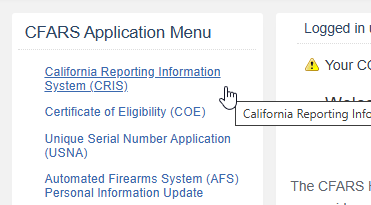
Step 4: Then Click on Report of Operation of Law for inherited firearms or Report of Intra-Familial Firearm Transaction if your family member was still alive when you received the firearm.
Step 5: Fill out the form following all the directions. If you are inheriting a firearm choose the appropriate option based on your circumstance:
If you are doing an Intra-Familial Firearm Transaction chose the relationship:
Step 6: Complete filling out the form and “Add to Cart”.
Step 7: Be sure to pay for the transaction.